What is an AI Agent Harness? Why Agent = Model + Harness
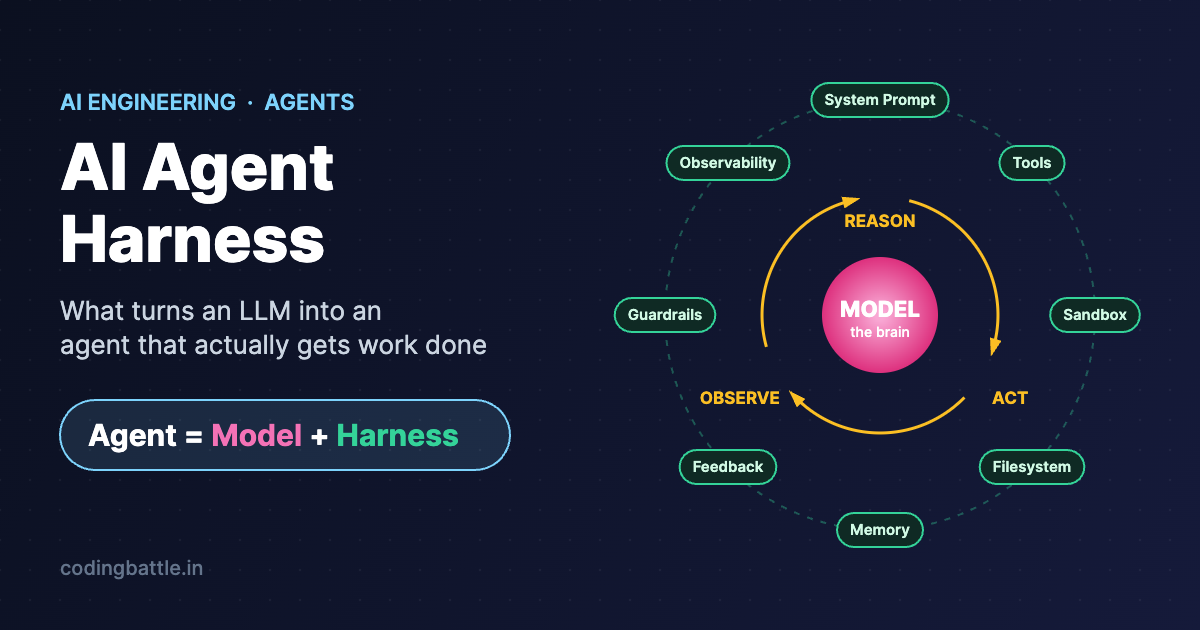
Everyone is talking about AI agents — tools that don't just answer questions but actually do things: fix bugs, book meetings, analyse files, write reports. But here's the secret most beginners miss: the large language model (LLM) is only half of an agent. The other half is the harness.
In this blog, we'll understand what an AI agent harness is, how the reason–act–observe loop works, the eight building blocks of a production harness, the most common ways agents fail, and why harness engineering is becoming one of the most valuable skills for AI engineers.
What is an AI Agent Harness?
An AI agent harness is all the software that sits around an LLM and lets it take actions in the real world. The model thinks and decides what to do next. The harness is what actually does it — calling tools, running code, reading files, remembering past work and enforcing safety rules.
Agent = Model + Harness
A simple way to remember it: the model is the brain, and the harness is the body and workspace around that brain. A brain alone can think, but it can't pick up a pen. A raw LLM can answer questions, but on its own it can't run a script, hit an API, open a file or finish a multi-step task.
| Part | What it does | Analogy |
|---|---|---|
| Model | Reads context, reasons and decides the next step | The brain |
| Harness | Executes actions, manages memory and tools, enforces rules | The body + desk + toolbox |
| Agent | The complete system: model + harness working together | A worker who can think and act |
The Heart of Every Agent: Reason → Act → Observe
Most agents run in a loop. Once you understand this loop, the job of the harness becomes very clear.
- Reason — The model looks at its context (the task, memory, previous results) and decides the next action.
- Act — The harness performs that action: runs a tool, executes code in a sandbox, calls an API or writes a file.
- Observe — The harness captures the result and feeds it back into the model's context.
- Repeat — The loop continues until the task is finished (or a stop condition is hit).
This pattern is popularly known as ReAct (Reasoning + Acting), introduced by Shunyu Yao and colleagues in 2022.
Example: Imagine a coding agent asked to fix a failing test. The model suggests a code change. The harness applies it, runs the test suite inside an isolated sandbox and returns the output. If a test still fails, the model reads the error, reasons about it and tries another fix. The model focuses on thinking; the harness handles all the doing.
A minimal harness in Python (pseudo-code)
def run_agent(task, llm, tools, max_steps=10):
    messages = [
        {"role": "system", "content": SYSTEM_PROMPT},
        {"role": "user", "content": task},
    ]
    for step in range(max_steps):
        reply = llm.chat(messages, tools=tools.schemas())   # REASON
        if reply.is_final_answer:
            return reply.text

        call = reply.tool_call
        if not guardrails.allowed(call):                    # SAFETY CHECK
            result = "Action blocked: needs human approval"
        else:
            result = tools.run(call.name, call.args)        # ACT

        logger.trace(step, call, result)                    # OBSERVABILITY
        messages.append({"role": "tool", "content": result})  # OBSERVE
        messages = memory.compact(messages)                 # CONTEXT MANAGEMENT

    return "Stopped: step limit reached"
Notice that the LLM call is just one line. Everything else — the loop, tools, guardrails, logging and memory — is the harness.
8 Building Blocks of a Production Harness
1. System Prompt
The standing instructions the model sees on every run: who it is, what its goal is and which rules it must follow. A vague or conflicting system prompt is one of the top reasons agents behave unpredictably.
2. Tools
Functions the model can call — web search, database queries, sending email, calling an API, running code. The model chooses the tool; the harness executes it and returns the result. A growing trend is to give agents one powerful general tool — the ability to write and run code — instead of dozens of tiny single-purpose tools.
3. Sandbox
An isolated environment where the agent can execute code safely. Running AI-generated code directly on your laptop or production server is risky; a sandbox can be monitored, reset or destroyed if something goes wrong, and many sandboxes can run in parallel.
4. Filesystem
A place to read and write files — code, notes, plans, intermediate results — that survive between steps and sessions. Files let agents make progress on long tasks and share work with humans or other agents.
5. Memory and Context Management
An LLM only "remembers" what fits inside its context window. The harness decides what to keep, what to summarise and what to drop as a conversation grows — this is called context compaction. Across sessions, the harness stores and retrieves relevant history so the agent can pick up where it left off.
6. Feedback Loops and Self-Verification
Good harnesses don't blindly trust the model's output. They run tests, validate results or ask the model to review its own work before moving on. These check-and-correct loops are what make long, complex tasks reliable.
7. Guardrails and Human-in-the-Loop
Rules that block unsafe or unapproved actions. For example: ask a human before deleting files, emailing a customer or spending money. Human-in-the-loop approval is often mandatory for high-risk actions.
8. Observability
Logs, traces and dashboards that show what the agent did, why, and where it went wrong. Developers need it for debugging; regulated industries need it as an audit trail. At scale, the same data powers evaluation — measuring whether agents behave correctly across thousands of runs, not just in a demo.
Why the Harness Can Matter as Much as the Model
Top models are getting closer to each other in raw capability. What increasingly separates a great agent from a frustrating one is the harness: how well it manages memory, orchestrates tools, verifies results and enforces guardrails.
On public agent benchmarks, the same model can score very differently depending on the harness wrapped around it. For many workflow-heavy tasks, a strong harness around a mid-tier model can beat a weak harness around a top-tier model. Upgrading the model helps — but only a solid harness turns that extra intelligence into reliable results.
Prompt Engineering vs Context Engineering vs Harness Engineering
As models got smarter, the engineering focus kept moving outward — from the words in the prompt, to the information the model sees, to the whole system around the model.
| Discipline | Focus | Main output | Era |
|---|---|---|---|
| Prompt engineering | Wording the input for a better response | A well-crafted prompt | Early chatbots and LLM apps |
| Context engineering | Choosing what information the model sees, and when | Retrieval pipelines, memory design | RAG applications |
| Harness engineering | Designing the full system: tools, sandboxes, loops, guardrails | The harness itself | Agents and autonomous workflows |
Prompt and context engineering don't disappear — they live inside harness engineering as pieces of the bigger system.
7 Common Ways Agent Harnesses Fail
In real projects, most agent failures come from the harness, not the model. Watch out for these:
- Context rot — the history grows so long that reasoning quality drops. Fix: summarise or trim old context.
- Tool overload — too many tools confuse the model and slow every decision.
- Brittle tool wiring — a small change in a tool's description or schema makes the model misuse it, often silently.
- High latency — many sequential tool calls can make a single response take 10+ seconds.
- Irrelevant retrieval — pulling the wrong documents leads to confident but wrong answers.
- Weak verification — without tests or self-checks, agents stop early or declare success on half-done work.
- Missing guardrails — agents send messages, delete data or make purchases without proper approval.
Scaling Agents Across a Team or Company
Organisations rarely build just one agent. Different teams build many agents on different models. Without a shared approach this leads to agent sprawl — lots of disconnected agents that nobody can properly govern, evaluate or improve.
The fix is a shared harness layer: one common place that controls what data and tools agents can access, which actions they may take, how they are logged and evaluated, and that lets teams swap the underlying model without rebuilding everything around it.
The Future of Agent Harnesses
As models get better at planning, multi-step reasoning and fixing their own mistakes, some work the harness does today will move into the model. But the harness isn't going away — sandboxes, tools, guardrails, observability and feedback loops will still decide whether an agent is safe and reliable in the real world. Two ideas worth watching:
- Disposable harnesses — lightweight harnesses spun up for a single task and thrown away afterwards, made practical by fast, cheap execution environments.
- Natural-language agent harnesses — describing how an agent should behave in plain English instead of code, with a shared runtime that interprets those instructions.
Conclusion
The model holds the intelligence; the harness turns that intelligence into dependable work. A strong harness can make an average model genuinely useful, while a weak harness can waste even the best model. If you want to become an AI or ML engineer who builds real products, learning to design harnesses — tools, memory, sandboxes, guardrails, evaluation — is one of the best investments you can make right now.
Frequently Asked Questions
What is the difference between an AI agent and an AI harness?
The agent is the complete system. The harness is the execution layer inside it that provides tools, memory, guardrails and workflow control. You talk to the agent; the harness is what makes it work.
How is harness engineering different from prompt engineering?
Prompt engineering improves the input text. Harness engineering designs the whole system around the model — tools, execution environments, safety controls and feedback loops. A prompt is just one component of a harness.
What are the core components of an agent harness?
System prompt, tools, sandbox, filesystem, memory/context management, feedback loops, guardrails and observability.
Do I need a framework to build a harness?
No. As the pseudo-code above shows, a basic harness is just a loop around an LLM API with tool execution, logging and a few safety checks. Frameworks help at scale, but building a small one yourself is the best way to learn.
Sources
Enjoyed this post?
Get new CodingBattle posts by email. No spam, unsubscribe anytime.
Comments